CopilotChat.nvim is a Neovim plugin that brings GitHub Copilot Chat capabilities directly into your editor. It provides:
- 🤖 GitHub Copilot Chat integration with official model support (GPT-4o, Claude 3.7 Sonnet, Gemini 2.0 Flash, and more)
- 💻 Rich workspace context powered by smart embeddings system
- 🔒 Explicit data sharing - only sends what you specifically request, either as resource or selection (by default visual selection)
- 🔌 Modular provider architecture supporting both official and custom LLM backends (Ollama, Gemini, Mistral.ai and more)
- 📝 Interactive chat UI with completion, diffs and quickfix integration
- 🎯 Powerful prompt system with composable templates and sticky prompts
- 🔄 Extensible function calling system for granular workspace understanding (buffers, files, git diffs, URLs, and more)
- ⚡ Efficient token usage with tiktoken token counting and history management
# Requirements
- [Neovim 0.10.0+](https://neovim.io/) - Older versions are not officially supported
- [curl](https://curl.se/) - Version 8.0.0+ recommended for best compatibility
- [Copilot chat in the IDE](https://github.com/settings/copilot) enabled in GitHub settings
> [!WARNING]
> For Neovim < 0.11.0, add `noinsert` or `noselect` to your `completeopt` otherwise chat autocompletion will not work.
> For best autocompletion experience, also add `popup` to your `completeopt` (even on Neovim 0.11.0+).
## Optional Dependencies
- [tiktoken_core](https://github.com/gptlang/lua-tiktoken) - For accurate token counting
- Arch Linux: Install [`luajit-tiktoken-bin`](https://aur.archlinux.org/packages/luajit-tiktoken-bin) or [`lua51-tiktoken-bin`](https://aur.archlinux.org/packages/lua51-tiktoken-bin) from AUR
- Via luarocks: `sudo luarocks install --lua-version 5.1 tiktoken_core`
- Manual: Download from [lua-tiktoken releases](https://github.com/gptlang/lua-tiktoken/releases) and save as `tiktoken_core.so` in your Lua path
- [git](https://git-scm.com/) - For git diff context features
- [ripgrep](https://github.com/BurntSushi/ripgrep) - For improved search performance
- [lynx](https://lynx.invisible-island.net/) - For improved URL context features
## Integration with pickers
For various plugin pickers to work correctly, you need to replace `vim.ui.select` with your desired picker (as the default `vim.ui.select` is very basic). Here are some examples:
- [fzf-lua](https://github.com/ibhagwan/fzf-lua?tab=readme-ov-file#neovim-api) - call `require('fzf-lua').register_ui_select()`
- [telescope](https://github.com/nvim-telescope/telescope-ui-select.nvim?tab=readme-ov-file#telescope-setup-and-configuration) - setup `telescope-ui-select.nvim` plugin
- [snacks.picker](https://github.com/folke/snacks.nvim/blob/main/docs/picker.md#%EF%B8%8F-config) - enable `ui_select` config
- [mini.pick](https://github.com/echasnovski/mini.pick/blob/main/lua/mini/pick.lua#L1229) - set `vim.ui.select = require('mini.pick').ui_select`
Plugin features that use picker:
- `:CopilotChatPrompts` - for selecting prompts
- `:CopilotChatModels` - for selecting models
- `#:` - for selecting function input
# Installation
## [lazy.nvim](https://github.com/folke/lazy.nvim)
```lua
return {
{
"CopilotC-Nvim/CopilotChat.nvim",
dependencies = {
{ "github/copilot.vim" }, -- or zbirenbaum/copilot.lua
{ "nvim-lua/plenary.nvim", branch = "master" }, -- for curl, log and async functions
},
build = "make tiktoken",
opts = {
-- See Configuration section for options
},
-- See Commands section for default commands if you want to lazy load on them
},
}
```
See [@jellydn](https://github.com/jellydn) for [configuration](https://github.com/jellydn/lazy-nvim-ide/blob/main/lua/plugins/extras/copilot-chat-v2.lua)
## [vim-plug](https://github.com/junegunn/vim-plug)
Similar to the lazy setup, you can use the following configuration:
```vim
call plug#begin()
Plug 'github/copilot.vim'
Plug 'nvim-lua/plenary.nvim'
Plug 'CopilotC-Nvim/CopilotChat.nvim'
call plug#end()
lua << EOF
require("CopilotChat").setup {
-- See Configuration section for options
}
EOF
```
## Manual
1. Put the files in the right place
```
mkdir -p ~/.config/nvim/pack/copilotchat/start
cd ~/.config/nvim/pack/copilotchat/start
git clone https://github.com/github/copilot.vim
git clone https://github.com/nvim-lua/plenary.nvim
git clone https://github.com/CopilotC-Nvim/CopilotChat.nvim
```
2. Add to your configuration (e.g. `~/.config/nvim/init.lua`)
```lua
require("CopilotChat").setup {
-- See Configuration section for options
}
```
See [@deathbeam](https://github.com/deathbeam) for [configuration](https://github.com/deathbeam/dotfiles/blob/master/nvim/.config/nvim/lua/config/copilot.lua)
# Features
## Commands
Commands are used to control the chat interface:
| Command | Description |
| -------------------------- | ----------------------------- |
| `:CopilotChat ?` | Open chat with optional input |
| `:CopilotChatOpen` | Open chat window |
| `:CopilotChatClose` | Close chat window |
| `:CopilotChatToggle` | Toggle chat window |
| `:CopilotChatStop` | Stop current output |
| `:CopilotChatReset` | Reset chat window |
| `:CopilotChatSave ?` | Save chat history |
| `:CopilotChatLoad ?` | Load chat history |
| `:CopilotChatPrompts` | View/select prompt templates |
| `:CopilotChatModels` | View/select available models |
| `:CopilotChat` | Use specific prompt template |
## Key Mappings
Default mappings in the chat interface:
| Insert | Normal | Action |
| ------- | ------- | ------------------------------------------ |
| `` | - | Trigger/accept completion menu for tokens |
| `` | `q` | Close the chat window |
| `` | `` | Reset and clear the chat window |
| `` | `` | Submit the current prompt |
| - | `grr` | Toggle sticky prompt for line under cursor |
| - | `grx` | Clear all sticky prompts in prompt |
| `` | `` | Accept nearest diff |
| - | `gj` | Jump to section of nearest diff |
| - | `gqa` | Add all answers from chat to quickfix list |
| - | `gqd` | Add all diffs from chat to quickfix list |
| - | `gy` | Yank nearest diff to register |
| - | `gd` | Show diff between source and nearest diff |
| - | `gc` | Show info about current chat |
| - | `gh` | Show help message |
The mappings can be customized by setting the `mappings` table in your configuration. Each mapping can have:
- `normal`: Key for normal mode
- `insert`: Key for insert mode
For example, to change the submit prompt mapping or show_diff full diff option:
```lua
{
mappings = {
submit_prompt = {
normal = 's',
insert = ''
}
show_diff = {
full_diff = true
}
}
}
```
## Prompts
### Predefined Prompts
Predefined prompt templates for common tasks. Reference them with `/PromptName` in chat, use `:CopilotChat` or `:CopilotChatPrompts` to select them:
| Prompt | Description |
| ---------- | ------------------------------------------------ |
| `Explain` | Write an explanation for the selected code |
| `Review` | Review the selected code |
| `Fix` | Rewrite the code with bug fixes |
| `Optimize` | Optimize code for performance and readability |
| `Docs` | Add documentation comments to the code |
| `Tests` | Generate tests for the code |
| `Commit` | Write commit message using commitizen convention |
Define your own prompts in the configuration:
```lua
{
prompts = {
MyCustomPrompt = {
prompt = 'Explain how it works.',
system_prompt = 'You are very good at explaining stuff',
mapping = 'ccmc',
description = 'My custom prompt description',
}
}
}
```
### System Prompts
System prompts define the AI model's behavior. Reference them with `/PROMPT_NAME` in chat:
| Prompt | Description |
| ---------------------- | ------------------------------------------ |
| `COPILOT_BASE` | All prompts should be built on top of this |
| `COPILOT_INSTRUCTIONS` | Base instructions |
| `COPILOT_EXPLAIN` | Adds coding tutor behavior |
| `COPILOT_REVIEW` | Adds code review behavior with diagnostics |
Define your own system prompts in the configuration (similar to `prompts`):
```lua
{
prompts = {
Yarrr = {
system_prompt = 'You are fascinated by pirates, so please respond in pirate speak.',
},
NiceInstructions = {
system_prompt = 'You are a nice coding tutor, so please respond in a friendly and helpful manner.' .. require('CopilotChat.config.prompts').COPILOT_BASE.system_prompt,
}
}
}
```
### Sticky Prompts
Sticky prompts persist across chat sessions. They're useful for maintaining model or resource selection. They work as follows:
1. Prefix text with `> ` using markdown blockquote syntax
2. The prompt will be copied at the start of every new chat prompt
3. Edit sticky prompts freely while maintaining the `> ` prefix
Examples:
```markdown
> #glob:`*.lua`
> List all files in the workspace
> @models Using Mistral-small
> What is 1 + 11
```
You can also set default sticky prompts in the configuration:
```lua
{
sticky = {
'#glob:*.lua',
}
}
```
## Models
You can control which AI model to use in three ways:
1. List available models with `:CopilotChatModels`
2. Set model in prompt with `$model_name`
3. Configure default model via `model` config key
For supported models, see:
- [Copilot Chat Models](https://docs.github.com/en/copilot/using-github-copilot/ai-models/changing-the-ai-model-for-copilot-chat#ai-models-for-copilot-chat)
- [GitHub Marketplace Models](https://github.com/marketplace/models) (experimental, limited usage)
## Functions
Functions provide additional information and behaviour to the chat.
Tools can be organized into groups by setting the `group` property. Tools assigned to a group are not automatically made available to the LLM - they must be explicitly activated.
To use grouped tools in your prompt, include `@group_name` in your message. This allows the LLM to access and use all tools in that group during the current interaction.
Add tools using `#tool_name[:input]` syntax:
| Function | Input Support | Description |
| ------------- | ------------- | ------------------------------------------------------ |
| `buffer` | ✓ (name) | Retrieves content from a specific buffer |
| `buffers` | ✓ (scope) | Fetches content from multiple buffers (listed/visible) |
| `diagnostics` | ✓ (scope) | Collects code diagnostics (errors, warnings) |
| `file` | ✓ (path) | Reads content from a specified file path |
| `gitdiff` | ✓ (sha) | Retrieves git diff information (unstaged/staged/sha) |
| `gitstatus` | - | Retrieves git status information |
| `glob` | ✓ (pattern) | Lists filenames matching a pattern in workspace |
| `grep` | ✓ (pattern) | Searches for a pattern across files in workspace |
| `quickfix` | - | Includes content of files in quickfix list |
| `register` | ✓ (register) | Provides access to specified Vim register |
| `url` | ✓ (url) | Fetches content from a specified URL |
Examples:
```markdown
> #buffer:init.lua
> #buffers:visible
> #diagnostics:current
> #file:path/to/file.js
> #git:staged
> #glob:`**/*.lua`
> #grep:`function setup`
> #quickfix
> #register:+
> #url:https://example.com
```
Define your own functions in the configuration with input handling and schema:
```lua
{
functions = {
birthday = {
description = "Retrieves birthday information for a person",
uri = "birthday://{name}",
schema = {
type = 'object',
required = { 'name' },
properties = {
name = {
type = 'string',
enum = { 'Alice', 'Bob', 'Charlie' },
description = "Person's name",
},
},
},
resolve = function(input)
return {
{
uri = 'birthday://' .. input.name,
mimetype = 'text/plain',
data = input.name .. ' birthday info',
}
}
end
}
}
}
```
### External Functions
For external functions implementations, see the [discussion page](https://github.com/CopilotC-Nvim/CopilotChat.nvim/discussions/categories/functions).
## Selections
Selections determine the source content for chat interactions.
Available selections are located in `local select = require("CopilotChat.select")`:
| Selection | Description |
| --------- | ------------------------------------------------------ |
| `visual` | Current visual selection |
| `buffer` | Current buffer content |
| `line` | Current line content |
| `unnamed` | Unnamed register (last deleted/changed/yanked content) |
You can set a default selection in the configuration:
```lua
{
-- Uses visual selection or falls back to buffer
selection = function(source)
return select.visual(source) or select.buffer(source)
end
}
```
## Providers
Providers are modules that implement integration with different AI providers.
### Built-in Providers
- `copilot` - Default GitHub Copilot provider used for chat
- `github_models` - Provider for GitHub Marketplace models
- `copilot_embeddings` - Provider for Copilot embeddings, not standalone
### Provider Interface
Custom providers can implement these methods:
```lua
{
-- Optional: Disable provider
disabled?: boolean,
-- Optional: Embeddings provider name or function
embed?: string|function,
-- Optional: Get extra request headers with optional expiration time
get_headers?(): table, number?,
-- Optional: Get API endpoint URL
get_url?(opts: CopilotChat.Provider.options): string,
-- Optional: Prepare request input
prepare_input?(inputs: table, opts: CopilotChat.Provider.options): table,
-- Optional: Prepare response output
prepare_output?(output: table, opts: CopilotChat.Provider.options): CopilotChat.Provider.output,
-- Optional: Get available models
get_models?(headers: table): table,
}
```
### External Providers
For external providers (Ollama, LM Studio, Mistral.ai), see the [providers discussion page](https://github.com/CopilotC-Nvim/CopilotChat.nvim/discussions/categories/providers).
# Configuration
## Default Configuration
Below are all available configuration options with their default values:
```lua
{
-- Shared config starts here (can be passed to functions at runtime and configured via setup function)
system_prompt = 'COPILOT_INSTRUCTIONS', -- System prompt to use (can be specified manually in prompt via /).
model = 'gpt-4.1', -- Default model to use, see ':CopilotChatModels' for available models (can be specified manually in prompt via $).
tools = nil, -- Default tool or array of tools (or groups) to share with LLM (can be specified manually in prompt via @).
sticky = nil, -- Default sticky prompt or array of sticky prompts to use at start of every new chat (can be specified manually in prompt via >).
resource_processing = false, -- Enable intelligent resource processing (skips unnecessary resources to save tokens)
temperature = 0.1, -- Result temperature
headless = false, -- Do not write to chat buffer and use history (useful for using custom processing)
callback = nil, -- Function called when full response is received
remember_as_sticky = true, -- Remember config as sticky prompts when asking questions
-- default selection
-- see select.lua for implementation
selection = require('CopilotChat.select').visual,
-- default window options
window = {
layout = 'vertical', -- 'vertical', 'horizontal', 'float', 'replace', or a function that returns the layout
width = 0.5, -- fractional width of parent, or absolute width in columns when > 1
height = 0.5, -- fractional height of parent, or absolute height in rows when > 1
-- Options below only apply to floating windows
relative = 'editor', -- 'editor', 'win', 'cursor', 'mouse'
border = 'single', -- 'none', single', 'double', 'rounded', 'solid', 'shadow'
row = nil, -- row position of the window, default is centered
col = nil, -- column position of the window, default is centered
title = 'Copilot Chat', -- title of chat window
footer = nil, -- footer of chat window
zindex = 1, -- determines if window is on top or below other floating windows
},
show_help = true, -- Shows help message as virtual lines when waiting for user input
show_folds = true, -- Shows folds for sections in chat
highlight_selection = true, -- Highlight selection
highlight_headers = true, -- Highlight headers in chat, disable if using markdown renderers (like render-markdown.nvim)
auto_follow_cursor = true, -- Auto-follow cursor in chat
auto_insert_mode = false, -- Automatically enter insert mode when opening window and on new prompt
insert_at_end = false, -- Move cursor to end of buffer when inserting text
clear_chat_on_new_prompt = false, -- Clears chat on every new prompt
-- Static config starts here (can be configured only via setup function)
debug = false, -- Enable debug logging (same as 'log_level = 'debug')
log_level = 'info', -- Log level to use, 'trace', 'debug', 'info', 'warn', 'error', 'fatal'
proxy = nil, -- [protocol://]host[:port] Use this proxy
allow_insecure = false, -- Allow insecure server connections
chat_autocomplete = true, -- Enable chat autocompletion (when disabled, requires manual `mappings.complete` trigger)
log_path = vim.fn.stdpath('state') .. '/CopilotChat.log', -- Default path to log file
history_path = vim.fn.stdpath('data') .. '/copilotchat_history', -- Default path to stored history
headers = {
user = '## User ', -- Header to use for user questions
assistant = '## Copilot ', -- Header to use for AI answers
tool = '## Tool ', -- Header to use for tool calls
},
separator = '───', -- Separator to use in chat
-- default providers
-- see config/providers.lua for implementation
providers = require('CopilotChat.config.providers'),
-- default functions
-- see config/functions.lua for implementation
functions = require('CopilotChat.config.functions'),
-- default prompts
-- see config/prompts.lua for implementation
prompts = require('CopilotChat.config.prompts'),
-- default mappings
-- see config/mappings.lua for implementation
mappings = require('CopilotChat.config.mappings'),
}
```
## Customizing Buffers
Types of copilot buffers:
- `copilot-chat` - Main chat buffer
- `copilot-overlay` - Overlay buffers (e.g. help, info, diff)
You can set local options for plugin buffers like this:
```lua
vim.api.nvim_create_autocmd('BufEnter', {
pattern = 'copilot-*',
callback = function()
-- Set buffer-local options
vim.opt_local.relativenumber = false
vim.opt_local.number = false
vim.opt_local.conceallevel = 0
end
})
```
## Customizing Highlights
Types of copilot highlights:
- `CopilotChatHeader` - Header highlight in chat buffer
- `CopilotChatSeparator` - Separator highlight in chat buffer
- `CopilotChatStatus` - Status and spinner in chat buffer
- `CopilotChatHelp` - Help messages in chat buffer (help, references)
- `CopilotChatSelection` - Selection highlight in source buffer
- `CopilotChatKeyword` - Keyword highlight in chat buffer (e.g. prompts, tools)
- `CopilotChatAnnotation` - Annotation highlight in chat buffer (file headers, tool call headers, tool call body)
# API Reference
## Core
```lua
local chat = require("CopilotChat")
-- Basic Chat Functions
chat.ask(prompt, config) -- Ask a question with optional config
chat.response() -- Get the last response text
chat.resolve_prompt() -- Resolve prompt references
chat.resolve_tools() -- Resolve tools that are available for automatic use by LLM
chat.resolve_model() -- Resolve model from prompt (WARN: async, requires plenary.async.run)
-- Window Management
chat.open(config) -- Open chat window with optional config
chat.close() -- Close chat window
chat.toggle(config) -- Toggle chat window visibility with optional config
chat.reset() -- Reset the chat
chat.stop() -- Stop current output
-- Source Management
chat.get_source() -- Get the current source buffer and window
chat.set_source(winnr) -- Set the source window
-- Selection Management
chat.get_selection() -- Get the current selection
chat.set_selection(bufnr, start_line, end_line, clear) -- Set or clear selection
-- Prompt & Model Management
chat.select_prompt(config) -- Open prompt selector with optional config
chat.select_model() -- Open model selector
chat.prompts() -- Get all available prompts
-- Completion
chat.trigger_complete() -- Trigger completion in chat window
chat.complete_info() -- Get completion info for custom providers
chat.complete_items() -- Get completion items (WARN: async, requires plenary.async.run)
-- History Management
chat.save(name, history_path) -- Save chat history
chat.load(name, history_path) -- Load chat history
-- Configuration
chat.setup(config) -- Update configuration
chat.log_level(level) -- Set log level (debug, info, etc.)
```
## Chat Window
You can also access the chat window UI methods through the `chat.chat` object:
```lua
local window = require("CopilotChat").chat
-- Chat UI State
window:visible() -- Check if chat window is visible
window:focused() -- Check if chat window is focused
-- Message Management
window:get_message(role) -- Get last chat message by role (user, assistant, tool)
window:add_message({ role, content }, replace) -- Add or replace a message in chat
window:add_sticky(sticky) -- Add sticky prompt to chat message
-- Content Management
window:append(text) -- Append text to chat window
window:clear() -- Clear chat window content
window:finish() -- Finish writing to chat window
-- Navigation
window:follow() -- Move cursor to end of chat content
window:focus() -- Focus the chat window
-- Advanced Features
window:get_closest_message(role) -- Get message closest to cursor
window:get_closest_block(role) -- Get code block closest to cursor
window:overlay(opts) -- Show overlay with specified options
```
## Example Usage
```lua
-- Open chat, ask a question and handle response
require("CopilotChat").open()
require("CopilotChat").ask("#buffer Explain this code", {
callback = function(response)
vim.notify("Got response: " .. response:sub(1, 50) .. "...")
return response
end,
})
-- Save and load chat history
require("CopilotChat").save("my_debugging_session")
require("CopilotChat").load("my_debugging_session")
-- Use custom sticky and model
require("CopilotChat").ask("How can I optimize this?", {
model = "gpt-4.1",
sticky = {"#buffer", "#gitdiff:staged"}
})
```
For more examples, see the [examples wiki page](https://github.com/CopilotC-Nvim/CopilotChat.nvim/wiki/Examples-and-Tips).
# Development
## Setup
To set up the environment:
1. Clone the repository:
```bash
git clone https://github.com/CopilotC-Nvim/CopilotChat.nvim
cd CopilotChat.nvim
```
2. Install development dependencies:
```bash
# Install pre-commit hooks
make install-pre-commit
```
To run tests:
```bash
make test
```
## Contributing
1. Fork the repository
2. Create your feature branch
3. Make your changes
4. Run tests and lint checks
5. Submit a pull request
See [CONTRIBUTING.md](/CONTRIBUTING.md) for detailed guidelines.
# Contributors
Thanks goes to these wonderful people ([emoji key](https://allcontributors.org/docs/en/emoji-key)):
This project follows the [all-contributors](https://github.com/all-contributors/all-contributors) specification. Contributions of any kind are welcome!
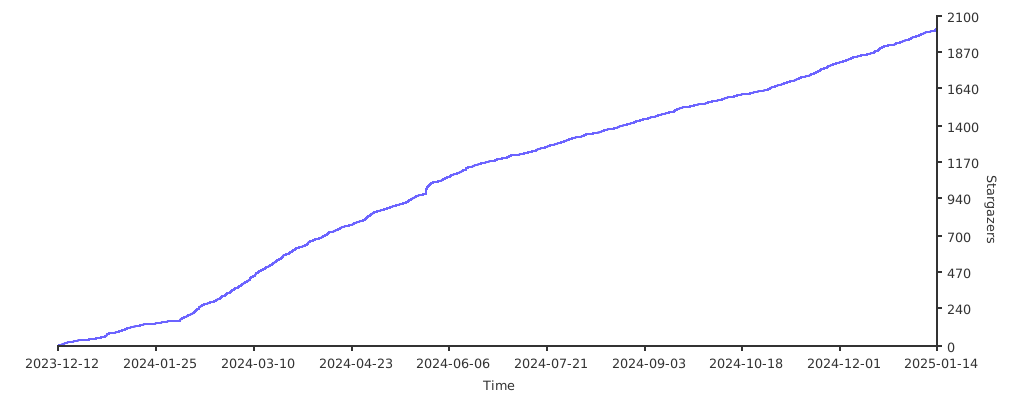
# Stargazers
[](https://starchart.cc/CopilotC-Nvim/CopilotChat.nvim)


