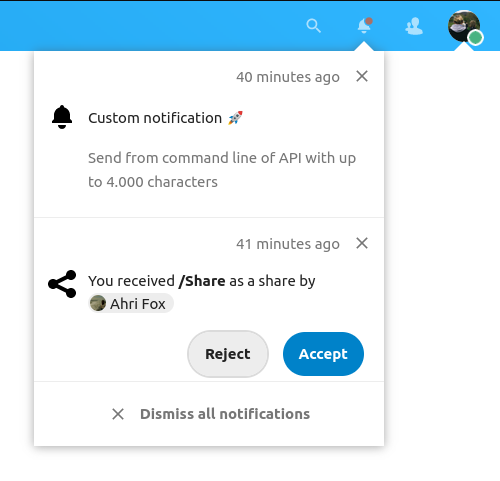
Allows admins to generate notifications for users via the console or an HTTP endpoint
$ sudo -u www-data ./occ notification:generate \
  'admin' 'Short message up to 255 characters' \
  -l 'Optional: longer message with more details, up to 4000 characters'
Tip
Specify an object type and object id to delete previous notifications about
the same thing,e.g. when the notification is about an update for "LibX" to
version "12", use --object-type='update' --object-id='libx', so that a later
notification for version "13" can automatically dismiss the notification for
version "12" if it was not removed in the meantime.
Tip
Specify the --output-id-only option and store it to later be able to delete
the generated notification using the notification:delete command.
$ sudo -u www-data ./occ notification:generate --help
Usage:
  notification:generate [options] [--] <user-id> <short-message>

Arguments:
  user-id                                  User ID of the user to notify
  short-message                            Short message to be sent to the user (max. 255 characters)

Options:
      --short-parameters=SHORT-PARAMETERS  JSON encoded array of Rich objects to fill the short-message, see https://github.com/nextcloud/server/blob/master/lib/public/RichObjectStrings/Definitions.php for more information
  -l, --long-message=LONG-MESSAGE          Long message to be sent to the user (max. 4000 characters) [default: ""]
      --long-parameters=LONG-PARAMETERS    JSON encoded array of Rich objects to fill the long-message, see https://github.com/nextcloud/server/blob/master/lib/public/RichObjectStrings/Definitions.php for more information
      --object-type=OBJECT-TYPE            If an object type and id is provided, previous notifications with the same type and id will be deleted for this user (max. 64 characters)
      --object-id=OBJECT-ID                If an object type and id is provided, previous notifications with the same type and id will be deleted for this user (max. 64 characters)
      --output-id-only                     When specified only the notification ID that was generated will be printed in case of success
The URL had to be changed when upgrading from Nextcloud 20 to 21
curl -H "OCS-APIREQUEST: true" -X POST \
  https://admin:admin@localhost/ocs/v2.php/apps/notifications/api/v2/admin_notifications/admin \
  -d "shortMessage=Short message up to 255 characters" \
  -d "longMessage=Optional: longer message with more details, up to 4000 characters"
curl -H "OCS-APIREQUEST: true" -X POST \
  https://<admin-user>:<admin-app-password-token>@<server-url>/ocs/v2.php/apps/notifications/api/v2/admin_notifications/<user-id> \
  -d "shortMessage=<short-message>" \
  -d "longMessage=<long-message>"
| Placeholder | Description |
|---|---|
<admin-user> |
User ID of a user with admin privileges |
<admin-app-password-token> |
Password or an "app password" of the "admin-user" |
<server-url> |
URL with Webroot of your Nextcloud installation |
<user-id> |
User ID of the user to notify |
<short-message> |
Short message to be sent to the user (max. 255 characters) |
<long-message> |
Long message to be sent to the user (max. 4000 characters) |
| Status | Description |
|---|---|
| 200 | Notification was created successfully |
| 400 | Too long or empty short-message, too long long-message |
| 404 | Unknown user |
| 500 | Unexpected server error |
| 503 | Instance is in maintenance mode |
Both the occ command and the HTTP request generate the same notification