 GitHub Community
Can't activate in Visual Studio #13759

Replies: 15 comments 16 replies

-
Beta Was this translation helpful? Give feedback.

-
|
|
Beta Was this translation helpful? Give feedback.

-
|
Beta Was this translation helpful? Give feedback.

-
|
Check out my comment below. Basically you need to start Visual Studio as Administrator, this will allow it to open up the window in a browser for filling in the code that gets copied to your clipboard |
Beta Was this translation helpful? Give feedback.

-
|
Same problem here. I'm trying to use Copilot in a Unity project that I had already initialized. When I click to sign in though visual studio using the Copilot plugin I get the exact same error message. |
Beta Was this translation helpful? Give feedback.
-
|
I resolved the issue. Start Visual Studio as an Administrator. Then open your desired project, and then press sign in. I still had the issue that it didn't want to copy the code to clipboard, but it did finally open the login page where you fill in the code to activate the plugin! |
Beta Was this translation helpful? Give feedback.

-
|
U're lucky. I wasn't able to open the login page even launching as an admin. I was able to do it on JetBrains however, but not in VS2022 :/ |
Beta Was this translation helpful? Give feedback.

-
|
I opened Visual Studio with administrator permission as you said and finally succeeded!! I've been struggling with this problem for two months! |
Beta Was this translation helpful? Give feedback.

-
|
Same thing for me with Visual Studio 2022. Start VS as Administrator, then this window is prompted: For other person that can access to the "device activation code", but not the web page,I think you can enter it here: |

Beta Was this translation helpful? Give feedback.

-
|
I wish they would just give you the code in the dialog instead of needing a workaround. |
Beta Was this translation helpful? Give feedback.

-
|
The latest version will properly detect this issue and not fail. It will show the activation code in the dialog, output window and status bar, so you can manually navigate to https://github.com/login/device and enter the code there. |
Beta Was this translation helpful? Give feedback.

-
|
I have version 1.14.0.1 and it does not have the activation code in the output. did that change. |
Beta Was this translation helpful? Give feedback.

-
|
Thanks. Only your answer helped. |
Beta Was this translation helpful? Give feedback.

-
|
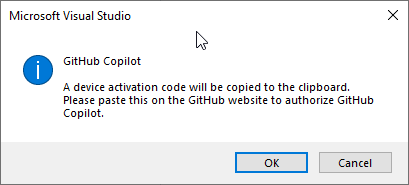
Installed latest version. After restart and loading of project, I see the dialog (no activation code is shown on the dialog). Pressing ok does not open any other page/browser and nothing is copied in to the clipboard.
I tried full laptop restart and admin mode. Made no difference. Here is the GitHub Copilot output: I'm using Windows 10 with Visual Studio Enterprise 17.1.5 Having to give up using it for now. There is no way to get it working that I can see. |
Beta Was this translation helpful? Give feedback.
-
|
following - I have this same issue. |
Beta Was this translation helpful? Give feedback.

-
|
This has been my experience for the last few months as well. I have yet to find a resolution and I gave up about 6 weeks ago. GitHub CoPilot works really well in VS Code, and I figured I'd give it another shot in Visual Studio, but still no dice. Can't get around this copy/paste authorization thing... |
Beta Was this translation helpful? Give feedback.

-
|
following - I have this same issue. Any news? |
Beta Was this translation helpful? Give feedback.

-
|
same problem here. |
Beta Was this translation helpful? Give feedback.

-
|
Crazy that they have yet to fix this... I have the same issue and yeah it is the corporate network smh |
Beta Was this translation helpful? Give feedback.

-
|
I am having the same issue, I started as admin, but the code will not copy |
Beta Was this translation helpful? Give feedback.
-
|
Same |
Beta Was this translation helpful? Give feedback.

-
|
Solved: Login to your corresponding microsoft account in VS, close the editor and reopen, try to get this prompt window to show again, and now look at the console for the exact code |
Beta Was this translation helpful? Give feedback.

-
|
Tried every thing was said here. Nothing. |
Beta Was this translation helpful? Give feedback.
-
|
Same |
Beta Was this translation helpful? Give feedback.

-
|
@ricnader @henrycates sounds frustrating. got a moment to screenshare? I'd love to investigate. email me at ayim at github dot com and we'll get the ball rolling. |
Beta Was this translation helpful? Give feedback.

-
|
I had to disconnect from my VPN to get the code and window to pop up. |
Beta Was this translation helpful? Give feedback.

-
|
I appreciate the simplicity of the GitHub Copilot activation process, but I believe it could be improved to accommodate a wider range of scenarios. In my situation, the activation process required me to be logged in as an administrator. Unfortunately, my administrator account does not have a license for the version of Visual Studio I am using, which prevents me from logging in to obtain the device activation code. Additionally, I have noticed that other users have encountered issues while connected to a VPN. Since my work computer requires VPN access, I am concerned that I may face this problem as well. To address these issues, I suggest including the activation code and URL directly within the activation dialog. This would enable users facing similar challenges to complete the activation process and provide a workaround for those who cannot use the current activation method. |
Beta Was this translation helpful? Give feedback.

-
|
I have exactly the same issues, and it looks that it has been ongoing thing for a while. |
Beta Was this translation helpful? Give feedback.

-
|
If you are using a company laptop that has some corporate AD then it probably won't work and give you the "Request signInInitiate failed with message: self signed certificate in certificate chain". Welcome to Microsoft! Please join our Microsoft event to see this piece of work in action. Then sign up for that yearly enterprise subscription. Then please use our state of the art IDE where you can install this piece of art. Oh? It doesn't work? Sorry! Go use VS Code. We're working on Gopilot X:// |
Beta Was this translation helpful? Give feedback.

-
|
#Got this issue too... [DEBUG] [agent] [2023-05-23T09:52:09.136Z] Agent service starting |
Beta Was this translation helpful? Give feedback.

-
|
For me, there was no need to copy anything. Perhaps the process changed as of September 2023. But I also had this problem and the issue was simply going to your user profile at the top right of the window in visual studio and then you will see a GitHub icon: I had next to the GitHub icon a link to re authenticate with GitHub. I clicked it, a link opened in my browser and I got authenticated and all the problems went away. |

Beta Was this translation helpful? Give feedback.


 and others
Uh oh!
There was an error while loading. Please reload this page.
-
No new page opened after this prompt.
Got this instead:
Beta Was this translation helpful? Give feedback.
All reactions