 GitHub Community
Copilot VS 2022: Can't sign out from account #14252

Replies: 4 comments 7 replies

-
|
The same thing happened to me |
Beta Was this translation helpful? Give feedback.

-
|
@liuicl111 I found a temporary solution to this problem, at least if you're on Windows: Delete the two files ( after that, you can Sign in again. |
Beta Was this translation helpful? Give feedback.

-
|
My problem has been solved. Thank you |
Beta Was this translation helpful? Give feedback.

-
|
What if folder |
Beta Was this translation helpful? Give feedback.

-
|
@szybinfover2 same here |
Beta Was this translation helpful? Give feedback.

-
|
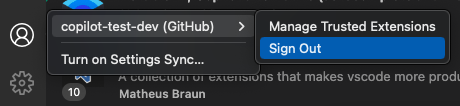
how to solve the same problem on mac? |
Beta Was this translation helpful? Give feedback.

-
|
After you sign out successfully, click on the Copilot icon at the right bottom corner and click "retry" if it gives you an error — after that it should prompt a sign in button |
Beta Was this translation helpful? Give feedback.

-
|
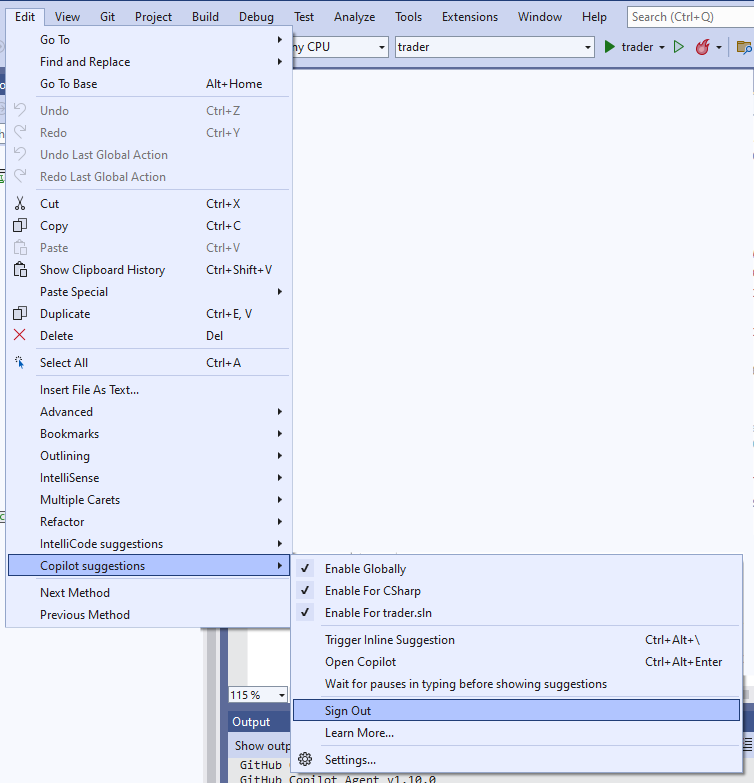
You can sign out from the same icon where you change all other Copilot settings:
The same menu is accessible from Edit > Copilot suggestions:
|

Beta Was this translation helpful? Give feedback.
-
|
This was not the case for me. It still said 'Sign in', even though I was signed in to an account that did not have Github Copilot access. |
Beta Was this translation helpful? Give feedback.

-
|
in VS2022: From Menu choose File >> Account Settings ; this will show all the logged-in account in VS. remove the Github account to sign-out |
Beta Was this translation helpful? Give feedback.

-
|
Thanks |
Beta Was this translation helpful? Give feedback.


Uh oh!
There was an error while loading. Please reload this page.
Uh oh!
There was an error while loading. Please reload this page.
-
I just downloaded Github Copilot for Visual Studio 2022, and unfortunately signed in with the wrong account.
There is no option to sign out in the Visual Studio 2022 version.
Please add that. Reinstalling the extension did not seem to work (I guess credentials are stored somewhere? However I don't know where.)
EDIT: Temporary solution on Windows:
Delete the two files (
hosts.jsonandterms.json) inC:\Users\%USERNAME%\AppData\Local\github-copilotBeta Was this translation helpful? Give feedback.
All reactions