Welcome to the Copilot Instructions repository!
This project provides a set of best practices, coding rules, and prompt instructions to guide AI-assisted development, especially with GitHub Copilot and similar tools.
- Defines clear coding standards and architectural rules (e.g., Domain-Driven Design, testing strategies).
- Provides prompt and instruction files for consistent, high-quality code generation.
- Helps teams and AI tools follow the same guidelines for maintainable, robust, and expressive code.
- Clone the repository
Open your terminal and run:git clone https://github.com/your-username/copilot-instructions.git
- Explore the repository
- Check
instructions/for coding rules and best practices - Review
skills/for specialized capabilities and bundled resources - Browse
agents/for custom AI personas - Install plugins from
plugins/for curated collections - Visit
website/for interactive documentation
- Check
- Apply the rules
- Follow the documented standards in your projects.
- Use these files to configure Copilot or other AI tools for consistent code generation.
- 🏛️ Domain-Driven Design (DDD) guidelines (see instructions)
- 📐 Specification pattern for business rules (see instructions)
- 🧪 Unit & Integration testing best practices (see instructions)
- 🗂️ Command/Query (CQRS) best practices (see command instructions)
- 📝 English-only documentation policy
- 🤖 Copilot and AI prompt instructions
- 🔄 TDD-first workflow for C# (see
copilot-instructions.md) - ❓ Follow-up Question Enforcement (see instructions)
AI must ask clarifying questions and show confidence before code generation. - 🌐 Microsoft MCP server integration: this repository integrates the official Microsoft MCP server to provide real-time access to Microsoft documentation and enhance AI-generated responses (learn more).
- 🐶 Husky setup prompts for .NET projects (see
prompts/huskydotnet.prompt.md) - 🤡 Microcks metadata instructions for API Mock and contract testing:
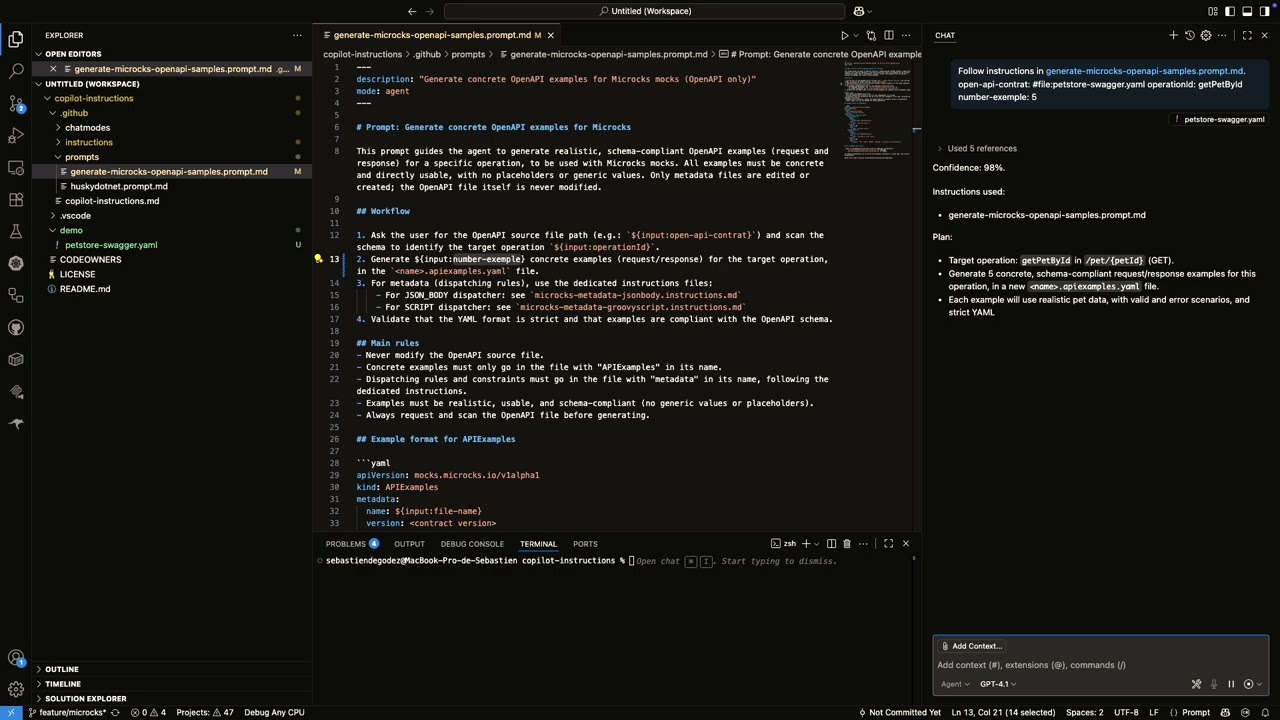
This repository follows the awesome-copilot structure and conventions for organizing instructions, skills, agents, and plugins to enhance GitHub Copilot capabilities.
- Instructions: Coding standards and best practices that apply to specific file patterns
- Skills: Self-contained capabilities that bundle SKILL.md files with related resources
- Agents: Custom AI personas for specialized workflows
- Plugins: Installable packages that bundle related skills and agents
├── instructions/          # Coding standards and best practices (.instructions.md)
├── agents/               # Custom AI agents (.agent.md)
├── skills/               # Self-contained capabilities with bundled resources
├── plugins/              # Installable packages bundling related agents and skills
│   └── csharp-clean-architecture-development/
├── website/              # Astro static documentation site
├── docs/                 # Documentation and implementation plans
├── .github/
│   └── workflows/        # GitHub Actions for deployment and automation
└── README.md
Comprehensive plugin for C# developers with DDD, Clean Architecture, CQRS, and testing best practices.
- Location:
plugins/csharp-clean-architecture-development/ - Skills: application-layer-testing, clean-architecture-dotnet
- Installation: See plugin README for details
See plugins/ for more available plugins.
A collection is a YAML file (in collections/) that groups related instructions, prompts, and chatmodes into a reusable package. Collections are designed to be consumed by APM (Agent Package Manager) to provide "primitives" for AI agents.
APM allows you to easily install and manage these collections in your projects. Instead of manually copying instruction files, you can use APM to:
- Install a curated set of instructions for a specific technology stack
- Keep your AI primitives up-to-date across multiple projects
- Share best practices with your team

A chatmode is a configuration file (in chatmodes/) that defines how Copilot or another AI assistant should behave in a specific context or workflow. For example, the architect chatmode makes the AI act as an experienced architect and technical lead, focusing on planning, documentation, and Markdown-only outputs. Chatmodes can set the tone, priorities, and constraints for the AI during a session or project.
A meta-chatmode is a special chatmode file (e.g., meta-chatmode.instructions.md) that defines how to write, structure, and validate other chatmode files. Meta-chatmodes ensure that all chatmodes follow a consistent format and best practices across the repository. They specify the required file structure, naming conventions, expected behavior, and validation checklist for chatmode files.
An instruction is a Markdown file (in instructions/) that defines coding rules, architectural standards, and best practices for the project. Instructions are always active and must be followed for all code and documentation generated in the repository. They ensure consistency, maintainability, and alignment with the project's technical vision (e.g., DDD, specification pattern, testing, commit conventions).
A meta-instruction is a special instruction file (e.g., meta-instructions.instructions.md) that defines how to write, structure, and validate other instruction files. Meta-instructions ensure that all instructions follow a consistent format and best practices across the repository.
A prompt is a template or guidance file (in prompts/) used to help Copilot or another AI tool generate code or documentation in a specific style or for a particular use case. Prompts are reusable and can steer the AI in a particular direction for a given task, such as enforcing TDD, writing API documentation, or generating test cases.
A skill is a modular, self-contained package (in skills/) that extends GitHub Copilot's capabilities with specialized knowledge, workflows, and tools. Skills act as "onboarding guides" for specific domains or tasks, transforming Copilot into a specialized agent.
- clean-architecture-dotnet: Complete guide for Clean Architecture with DDD and CQRS (no MediatR), including project initialization scripts and ArchUnit validation
- application-layer-testing: Testing Application layer handlers with sociable testing strategy (real Domain objects, mocked Infrastructure)
- skill-creator: Create and manage GitHub Copilot skills
Contributions are welcome!
Feel free to open issues or submit pull requests to improve the rules, add new practices, or update documentation.
⚡ Coming soon:
- Rules and best practices for API endpoints, feature slicing, and observability.
- The microcks-aspire-dotnet-demo repository is the official demo and testbed for these rules and practices.
Happy coding! 💡✨
If you have any questions, don’t hesitate to open an issue or reach out.