 GitHub Community
about how to unpublish GitHub pages #36129
Answered
by
DSDmark
bluesky62
asked this question in
Other Feature Feedback, Questions, & Ideas


-
|
I publish the GitHub page but now this page not showing there so I want to republish how i do please help |
Beta Was this translation helpful? Give feedback.
Answered by
DSDmark
Oct 14, 2022
Replies: 1 comment

-
|
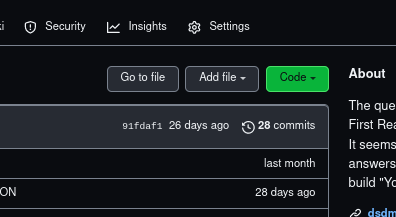
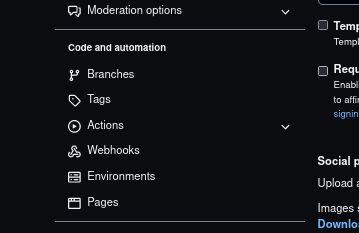
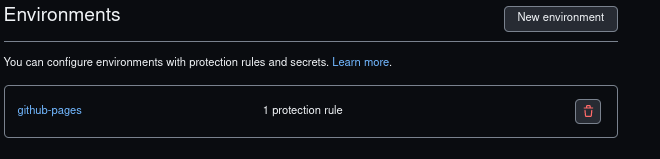
Hey, first just go in your repo and click on settingsand the on environments you can see your git page. In there you can delete that page
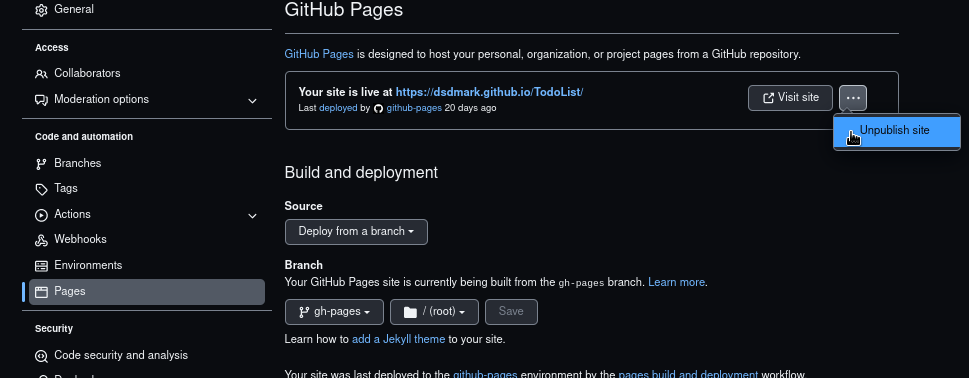
In simpler word https://github.com/user/repo-name/settings/environments if you want to unpublish your repo then you can do same step in page section in settings
|
Beta Was this translation helpful? Give feedback.
0 replies
Answer selected by
ettaboyle
Sign up for free
to join this conversation on GitHub.
Already have an account?
Sign in to comment


Hey,
so, there are two things that you can do if you want to republish your github-page
first just go in your repo and click on settings
and the on environments you can see your git page. In there you can delete that page
In simpler word
https://github.com/user/repo-name/settings/environments
if you want to unpublish your repo then you can do same step in page section in settings