 GitHub Community
Github Copilot stuck in disable mode #39918


-
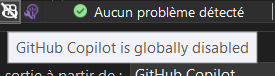
Select Topic AreaQuestion BodyI disabled GitHub copilot and now I want to enable it back but there is no option to do so. |

Beta Was this translation helpful? Give feedback.
Replies: 6 comments 5 replies

-
|
Hi there @serunos and welcome to our community! Thank you for asking a great question 🙂 To get started, introduce yourself in our official introduction thread |
Beta Was this translation helpful? Give feedback.

-
|
how about this |
Beta Was this translation helpful? Give feedback.

-
|
Hi, |
Beta Was this translation helpful? Give feedback.

-
|
Just ran into this problem. Had to create a keyboard shortcut to enable copilot globally (tools -> options -> keyboard --> Edit.Copilot.ToggleGlobally) . Once enabled globally I restarted Visual Studio and all the copilot options were showing up again. |
Beta Was this translation helpful? Give feedback.
-
|
Thanks, it worked for me. |
Beta Was this translation helpful? Give feedback.

-
|
Thanks,worked for me too |
Beta Was this translation helpful? Give feedback.

-
|
assign a keyboard shortcut to enable/disable the copilot, and it will work like a charm. |

Beta Was this translation helpful? Give feedback.

-
|
Had the same problem today on "1.85.1, 2023-12-13", and a system reboot fixed it.. ¯\_(ツ)_/¯ |
Beta Was this translation helpful? Give feedback.

-
|
Assign a keyboard shortcut to enable/disable the copilot, and it will work like a charm.
|

Beta Was this translation helpful? Give feedback.

-
|
This also worked for me. What strange and annoying behavior. |
Beta Was this translation helpful? Give feedback.

-
|
This is just a bad dev experience, considering it is a paid feature. It would be great if somebody could fix this issue! |
Beta Was this translation helpful? Give feedback.


Just ran into this problem. Had to create a keyboard shortcut to enable copilot globally (tools -> options -> keyboard --> Edit.Copilot.ToggleGlobally) . Once enabled globally I restarted Visual Studio and all the copilot options were showing up again.