 GitHub Community
Tab completion conflicts [GitHub Copilot] #7036


-
|
TAB is not completing the CoPilot suggestions, My Opinion: |
Beta Was this translation helpful? Give feedback.
Replies: 14 comments 20 replies

-
|
Which editor are you using? Thanks! |
Beta Was this translation helpful? Give feedback.

-
|
vs code |
Beta Was this translation helpful? Give feedback.

-
|
Please check our documentation about configuring VSCode extension - https://github.com/github/copilot-docs/blob/main/docs/visualstudiocode/configuring.md |
Beta Was this translation helpful? Give feedback.

-
|
that link doesn't work for me |
Beta Was this translation helpful? Give feedback.

-
|
+1 |
Beta Was this translation helpful? Give feedback.

-
|
+1 |
Beta Was this translation helpful? Give feedback.

-
|
+1 |
Beta Was this translation helpful? Give feedback.

-
Beta Was this translation helpful? Give feedback.

-
|
I am having the same issue in pyCharm. Sometimes Tab Auto completes with the suggestion, Other times it autocompletes with something from another pycharm plugin (Not sure which one). Can you change it to something else, or does someone have any ideas on how to prevent the other autocomplete from taking over. |
Beta Was this translation helpful? Give feedback.

-
|
Thanks! Although TAB is supposed to be handled first by GitHub Copilot, there seems to be a problem. |
Beta Was this translation helpful? Give feedback.
-
|
The latest update of the plugin allows to set your own shortcut. Could you try that, please? You can set up your shortcut at |
Beta Was this translation helpful? Give feedback.

-
|
Awesome, I changed the shortcut for Github Copilot 'Apply completion to Editor' to 'alt+shift+enter', working like a dream. |
Beta Was this translation helpful? Give feedback.

-
|
@rexebin - thank you. Changing Apply completion to Editor to |
Beta Was this translation helpful? Give feedback.

-
|
Hey I seem to be having the same problem, I don't know why but tab isn't doing anything. I'm not sure how to fix it as I have no idea what else tab is assigned to or how to change. Now it just moves forward four spaces I think |
Beta Was this translation helpful? Give feedback.
-
|
PyCharm 2021.2 (Professional Edition) |
Beta Was this translation helpful? Give feedback.
-
|
It took a lot of time to reconfigure but was finally done. My Suggestions for default keybinds:
2.Open Copilot (10 suggestions in separate pane): ALT + PERIOD.
|
Beta Was this translation helpful? Give feedback.

-
|
Is this on vscode? also, do you know to disable emmt |
Beta Was this translation helpful? Give feedback.
-
|
In settings.json File add this line: |
Beta Was this translation helpful? Give feedback.
-
|
OR you can skip emmt suggestion by ESCP |
Beta Was this translation helpful? Give feedback.

-
|
Thanks! It works for me. |
Beta Was this translation helpful? Give feedback.

-
|
I have the same issue in PhpStorm. The conflicting shortcut is “Indent Line or Selection”. When I unassign tab from it, Copilot autocompletion works. |
Beta Was this translation helpful? Give feedback.
-
|
Thanks! This was supposed to be overridden by Copilot, but it doesn't seem to work for your setup. With the latest update, it uses a different way to override existing shortcut. Could you try again with the new version? |
Beta Was this translation helpful? Give feedback.
-
|
@jansorg |
Beta Was this translation helpful? Give feedback.

-
|
@jansorg I want to be able to indent my code regardless of whether Copilot has any suggestions, so I've mapped completion to ⌥ + ⇥. Thank you! |
Beta Was this translation helpful? Give feedback.
-
|
But I have checked the latest version, [VS Code] |
Beta Was this translation helpful? Give feedback.

-
|
@jansorg I am still unable to change the "accept suggestion" key from I dont see
|
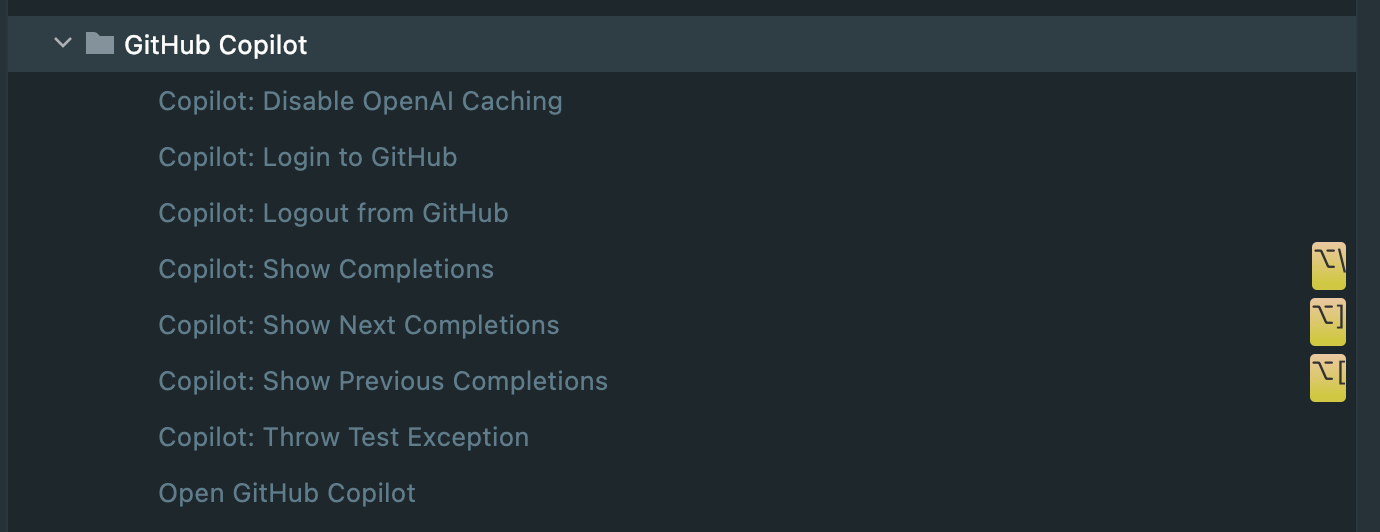
Beta Was this translation helpful? Give feedback.
-
|
@timkelty Updating to the latest version (1.1.4.220) should fix it. Make sure to the remove the custom repository if you were using the early bird releases. |
Beta Was this translation helpful? Give feedback.

-
|
🤦 forgot I had even done that. Thanks! |
Beta Was this translation helpful? Give feedback.

-
|
yeah i must be too blind or dumb for it too - in vscode there are no bindings set and yet its consuming my tab. its really infuriating when im in a class and it auto completes just a lone honestly i think the inline stuff sucks all around. i would prefer they go into the normal auto complete dropdown, or something similar (not the sidebar that opens, that is flow killing) instead of constantly messing with the DOM which does mess with all sorts of things like positioning of your cursor or where you were about to click the moment it came up with its brilliant idea of habitually creating non-valid syntax: https://pbs.twimg.com/media/FLQ2gNiXEAsFvjm?format=png&name=orig i am often reading other code while typing code to make sure my context is right, and with inline constantly pushing crap around its just bad experience for me. turning off inline tho is just about as bad as disabling the plugin completely, because im never going to sit here and ask for the sidebar, read its ideas, audit its idea, select an idea, and then audit it again because it always guesses api that does not exist. that will never be faster than just typing it and being done. i need an unobtrusive way to get suggestions live, like the normal vs code suggestion dropdowns that appear near your cursor. and since im dogpiling, an option to limit the length of a suggestion. every full function it suggests has been terrible. api that doesn't exist, formatting that is wrong for our codebase. but when it only suggests short things, like a list of function arguments, those work really really well. personally i never want the ai suggesting code that is longer than 1 line. it becomes too much a hassle to audit versus just typing a few characters and using the IDE's normal understanding of the codebase to tab complete. |
Beta Was this translation helpful? Give feedback.

-
|
In PyCharm, reassigning the tab key binding works fine, but every other key combination seems a lot less convenient, unless I want to break another binding. I've chosen to just live with it for now, as this only seems to present as an issue in yml/yaml files. 🤔 |
Beta Was this translation helpful? Give feedback.

-
|
I have found that it's when you use a live template (in JetBrains IDEs / PHPStorm) this happens. For example in JavaScript live templates is |
Beta Was this translation helpful? Give feedback.

-
|
this happens as well in CLion, it indents/adds a tab before the completion of GitHub copitlot |
Beta Was this translation helpful? Give feedback.

-
|
For my case I use the vsvim extension. You have to be in insert mode to have it work. |
Beta Was this translation helpful? Give feedback.

-
|
this issue also applies to VS2022 Microsoft Visual Studio Community 2022 Installed Version: Community Visual C++ 2022 00482-90000-00000-AA463 ASP.NET and Web Tools 17.11.230.51983 Atomineer Pro Documentation 1.0 Azure App Service Tools v3.0.0 17.11.230.51983 C# Tools 4.11.0-3.24374.1+f99bb16a395e48a05520ba7af1549b20bfdeee36 Common Azure Tools 1.10 Extensibility Message Bus 1.4.39 (main@e8108eb) Extension Manager 2022 1.3.4 File Icons 2.7 GitHub Copilot 0.2.1627.58842 JwtTools 0.2.18 Microsoft JVM Debugger 1.0 Mono Debugging for Visual Studio 17.11.3 (ba13144) NuGet Package Manager 6.11.0 PlantUML Editor 1.1.133 Razor (ASP.NET Core) 17.11.3.2436904+f07c7bb8e623ebcc1e1028cf11d101f866c77a79 SonarLint for Visual Studio 8.2.1.96841 TypeScript Tools 17.0.30715.2002 Visual Basic Tools 4.11.0-3.24374.1+f99bb16a395e48a05520ba7af1549b20bfdeee36 Visual F# Tools 17.11.0-beta.24317.3+c07c8ebad62f6629b36349381991a299598a8d74 Visual Studio Extension for SpecFlow 1.0 Visual Studio IntelliCode 2.2 VisualStudio.DeviceLog 1.0 VisualStudio.Mac 1.0 VSColorOutput64 2023.4 Xamarin 17.11.0.93 (d17-11@885b409) Xamarin Designer 17.11.3.10 (remotes/origin/d17-11@714146c62b) the issue can be reproduced by creating an eventhandler in c# using the += syntax, vs gives the implementation, but hitting tab does nothing. This should be standard bahvior and all the suggestiosn about changing the keymapping, I cna't find any key maping thatis linked to gihub at all. |
Beta Was this translation helpful? Give feedback.


Please check our documentation about configuring VSCode extension - https://github.com/github/copilot-docs/blob/main/docs/visualstudiocode/configuring.md